
Download eZ Publish – Open‑Source Content Management System, Free, Secure & Easy to Update
Overview
eZ Publish is a powerful, open‑source content management system (CMS) that targets both beginners and seasoned web developers. Built on the classic LAMP stack—MySQL, Apache, and PHP—eZ Publish eliminates the steep learning curve often associated with managing a dynamic website. After a quick installation, you provide the URL of your site, create an administrator account, and you’re ready to start publishing news, articles, images, and multimedia content.
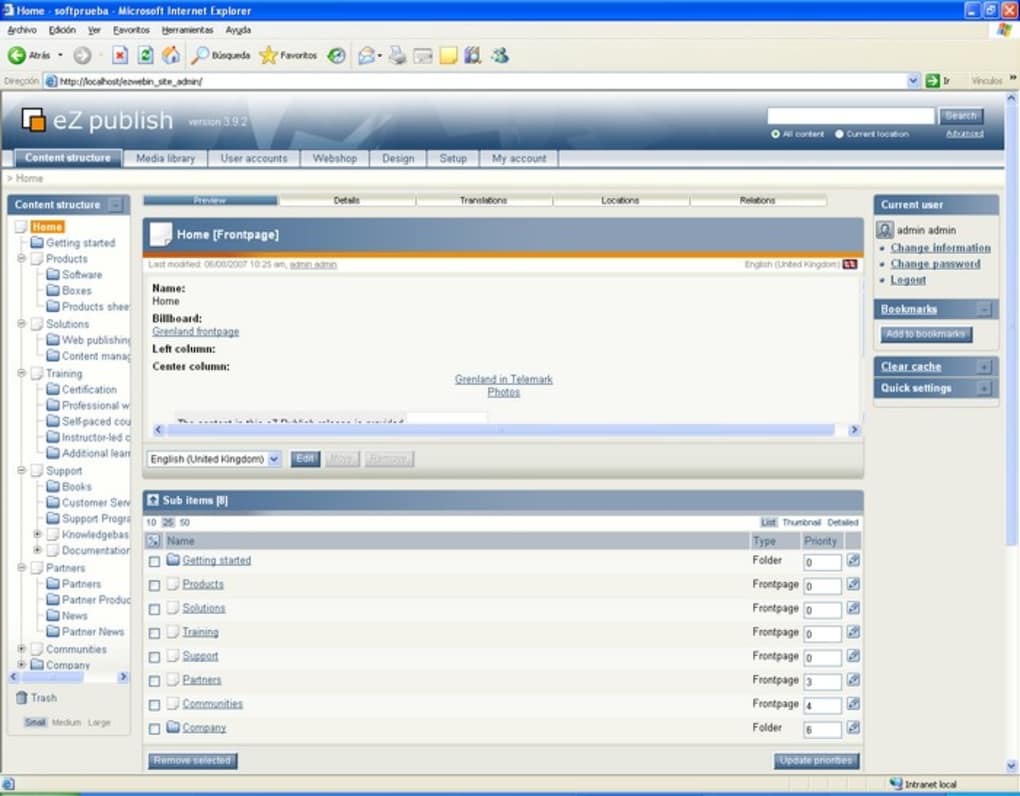
The interface revolves around a familiar Explorer‑style tree that groups the multimedia library, content hierarchy, CSS files, and user administration in a tidy, logical layout. This structured approach not only speeds up content creation but also enforces consistent design standards across the entire site. Because eZ Publish is community‑driven, it receives regular security patches and feature updates, ensuring that the platform stays current with modern web standards.
Whether you’re building a simple blog, a corporate portal, or a complex e‑commerce site, eZ Publish provides the flexibility to scale while keeping the backend intuitive. Its templating system, based on the powerful Twig engine, allows developers to separate presentation from logic, making theme customization a breeze. Moreover, the platform supports multilingual content out of the box, making it an ideal choice for global businesses looking to deliver localized experiences without juggling multiple installations.
Key Features
- Explorer‑Style Tree Navigation: A visual hierarchy for content, media, templates, and user management.
- Robust Publishing Workflow: Draft, review, schedule, and publish with role‑based permissions.
- Responsive Templating with Twig: Separate HTML/CSS from PHP logic for clean, maintainable themes.
- Multilingual Support: Create and manage content in multiple languages from a single installation.
- Extensible Plugin Architecture: Add e‑commerce, SEO, and analytics extensions via Composer packages.
- Full‑Text Search Engine: Powered by Apache Solr for fast, indexed content retrieval.
- Granular User Permissions: Define custom roles and fine‑tune access to nodes, classes, and actions.
- API‑First Design: RESTful and GraphQL endpoints for headless CMS implementations.
- Security‑Focused Updates: Regular patches, CSRF tokens, and built‑in XSS protection.
- Community & Enterprise Support: Free community forum plus optional paid support from eZ Systems.
The feature set of eZ Publish is deliberately crafted to balance ease of use with enterprise‑grade capabilities. Its modular design means you can start small—just a basic blog—and later integrate complex functionalities such as custom workflow rules, advanced search, or even a full‑fledged online store. Because the core is open source, developers have full access to the source code, enabling deep customizations that go beyond what typical “drag‑and‑drop” builders allow. The platform also embraces modern development practices: version control compatibility, Composer for dependency management, and Docker images for rapid environment provisioning. These tools reduce the time required to set up a development, staging, or production environment, allowing teams to focus on delivering content rather than wrestling with server configurations.
Installation, Usage & Compatibility
Step‑by‑Step Installation
Getting eZ Publish up and running is straightforward for anyone familiar with the LAMP stack. Follow these steps:
- Download the latest stable release from the official repository (a .zip or .tar.gz archive).
- Extract the files into your web root (e.g.,
/var/www/html/ezpublish). - Create a MySQL database and user with full privileges.
- Ensure Apache has the
mod_rewritemodule enabled and setAllowOverride Allfor the eZ Publish directory. - Open your browser and navigate to
http://yourdomain.com/ezpublish. The web installer will guide you through database configuration, admin account creation, and basic site settings. - After installation, log in to the admin interface (typically
/admin) to configure site appearance, install extensions, and start adding content.
Daily Usage Tips
Once installed, the Explorer‑style tree becomes your command center. Create content classes (e.g., Article, Blog Post, Gallery) to define the fields each node will contain. Use the built‑in WYSIWYG editor for rich text, or switch to raw HTML for full control. The versioning system automatically saves drafts, allowing you to revert to earlier revisions. For developers, the bin/console CLI offers commands for cache clearing, database migrations, and batch content imports.
Compatibility
eZ Publish runs on any operating system that can host the LAMP stack. Officially supported platforms include:
- Linux distributions (Ubuntu 20.04+, Debian 11+, CentOS 8+)
- Windows Server 2019/2022 with IIS (via PHP FastCGI)
- macOS (via Homebrew Apache, MySQL, PHP)
While the core is OS‑agnostic, performance is optimal on Linux servers with SSD storage and at least 2 GB of RAM for small sites. For larger deployments, consider scaling with a load balancer, separate database server, and Redis for caching. The application also works seamlessly with Docker; an official docker-compose.yml file is provided to spin up a fully configured environment in minutes.
Pros & Cons
Pros
- Free & Open Source: No licensing fees, with a vibrant community contributing extensions.
- Intuitive Content Tree: The Explorer‑like navigation simplifies site structure management.
- Scalable Architecture: From simple blogs to enterprise portals, the platform grows with your needs.
- Robust Security: Regular updates, built‑in CSRF/XSS protection, and granular permission controls.
- Multilingual Out‑of‑the‑Box: Manage translations without extra plugins.
- Extensive API: REST and GraphQL support enable headless implementations.
- Active Support Options: Community forums plus paid enterprise support from eZ Systems.
Cons
- Steeper Learning Curve for Advanced Features: Mastering custom workflows and extensions may require PHP knowledge.
- Limited Drag‑and‑Drop Builder: Unlike some modern SaaS CMSes, visual page building is not native.
- Performance Tuning Required for High Traffic: Large sites need caching layers and server optimization.
- Documentation Fragmentation: Official docs are comprehensive but sometimes scattered across version branches.
- Dependency on LAMP Stack: While flexible, you must maintain Apache/PHP/MySQL versions compatible with eZ Publish.
Frequently Asked Questions
Is eZ Publish truly free to use for commercial projects?
Yes. eZ Publish is released under the GNU GPLv2 license, which permits free use, modification, and distribution for commercial and non‑commercial projects alike. You only need to purchase paid support if you require guaranteed SLA response times.
Can I integrate eZ Publish with third‑party e‑commerce platforms?
Absolutely. eZ Publish’s modular architecture includes eCommerce bundles and a robust API, allowing seamless integration with platforms such as Magento, Shopify, or custom payment gateways via REST endpoints.
What are the minimum server requirements?
A minimum of PHP 7.4, MySQL 5.7 (or MariaDB 10.3), and Apache 2.4 with mod_rewrite enabled. For optimal performance, PHP 8.2 and MySQL 8 are recommended, along with at least 2 GB RAM and SSD storage.
Does eZ Publish support responsive design out of the box?
Yes. The default themes are built with responsive CSS frameworks (Bootstrap 5) and the Twig templating engine makes it easy to create mobile‑friendly layouts without extra code.
How frequently are security updates released?
The core team publishes security patches as soon as vulnerabilities are identified, typically on a monthly cadence. Critical issues are addressed immediately with emergency releases.
Conclusion & Call to Action
eZ Publish stands out as a mature, open‑source CMS that balances developer flexibility with an intuitive content hierarchy. Its free license, multilingual capabilities, and robust API make it a solid choice for businesses seeking a scalable solution without the recurring costs of proprietary platforms. While the lack of a native visual page builder may deter absolute beginners, the platform’s extensibility and strong community support more than compensate for that gap. If you’re ready to launch a secure, SEO‑friendly website that can grow alongside your brand, download eZ Publish today and start building your digital presence with confidence.
Remember to keep your installation up to date, enable caching, and consider professional support if you anticipate high traffic or complex integrations. Happy publishing!







